TeamZap HR platform / Attendance
Clock in with a tap. Know more about the working day.
A small sticker at the door can make a big difference to the morning. TeamZap connects NFC and mobile clocking with workplace location checks, breaks and timesheet review in one HR platform.
Free during our introductory period. No payment card required. If we introduce pricing, we will tell you well in advance.
What does it do?
Attendance software records when staff start, take breaks and finish. TeamZap adds available phone location to the record, helping managers review both the hours and their workplace context.
A simple start to the shift
Tap the sticker. Open the page. Confirm.
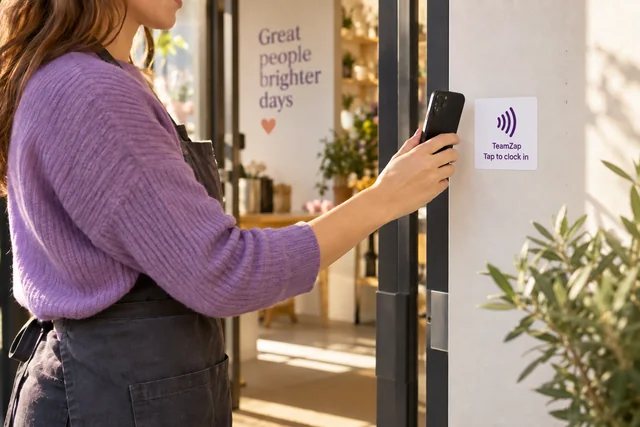
Place an activated square NFC sticker where staff arrive. An employee brings a compatible phone close to it, opens the clock page and confirms the attendance action.
The sticker is a flat adhesive label. It needs no battery, plug or wiring. Staff can also clock in and out directly in the TeamZap app.
- A compatible phone reads the sticker
- The employee confirms the action
- The attendance record reaches TeamZap
Geofencing, in plain language
A virtual boundary around your workplace.
Think of a geofence as a circle drawn on a map around the place people work. Set the workplace location and a radius that fits the site.
When an employee clocks in and phone location is available, TeamZap compares that position with the boundary. A manager can review whether it was inside, outside or not checked.
Context for the manager
An outside result is something to review.
Geofencing does not block a clock in. Phone location can be unavailable or imprecise, so an outside result is a prompt to look at the record and speak with the employee.
The attendance check describes a location at a clocking event. It is not a claim that the person stayed there for the whole shift.
- Inside: the reported position is within the boundary
- Outside: review the position and the circumstances
- Not checked: location was not available for the check
From clocking to agreed hours
Give starts, breaks and finishes a clear record.
Review clock in and clock out entries with recorded breaks. Investigate missing information and unexpected hours before approving the timesheet.
The rota gives you the plan. Attendance gives you the employee’s recorded day. Resolve the difference before handing hours to payroll preparation.

Understand the finish
Keep a useful explanation with the shift.
An employee can add an optional note at clock out. A late finish or other relevant detail can stay with that working day.
That gives the reviewer context to consider alongside the entries, instead of searching through a separate conversation.
The practical details
Questions about attendance
Understand the process before bringing your team into it.
What is NFC attendance?
NFC lets a compatible phone read a nearby workplace sticker. With TeamZap, the employee opens the clock page and confirms the attendance action.
Is the NFC sticker a powered clocking device?
No. It is a passive square adhesive sticker, with no power supply or wiring.
Do staff need to tap a sticker every time?
Staff can also use mobile clock in and clock out in the TeamZap app. NFC provides an additional workplace entry point.
What does geofencing mean for staff attendance?
It compares the phone location available at a clocking event with a virtual boundary around the workplace. The recorded result gives a manager context to review.
Will an outside result stop someone clocking in?
No. TeamZap records attendance and provides the geofence result for review. Location accuracy and availability can vary.
Are NFC stickers included with a free account?
Contact TeamZap about sticker availability and activation. The introductory software offer does not automatically include NFC stickers.
Connected in TeamZap
Keep the next step connected.
Your team. One HR platform.
Make clocking in the easy part.
Give staff a simple start and give managers a clearer record of the working day.
Create your free accountFree during our introductory period. No payment card required. If we introduce pricing, we will tell you well in advance.